django-unfold-2: 自定义组件
Unfold 配备了一套全面的预定义模板,旨在加速仪表盘开发。Unfold 组件最强大的特性之一,是它们能够被嵌套在单个模板文件内,从而实现近乎无限的布局组合。每个组件都可以访问一个 children变量,该变量包含了由其父组件所指定的内容。除了 children变量,组件还可以从父模板接收多个变量作为组件参数。这些参数可以通过与 Django 模板相同的方式传递,即使用 {% include with param1=value1 param2=value2 %}模板标签语法。这种灵活性使得组件结构既高度可定制又可复用,同时保持了模板的清晰与条理性。
本文描述了如何在django unfold自定义组件,并在页面中调用。参照Django Unfold 组件,页面效果如下所示。
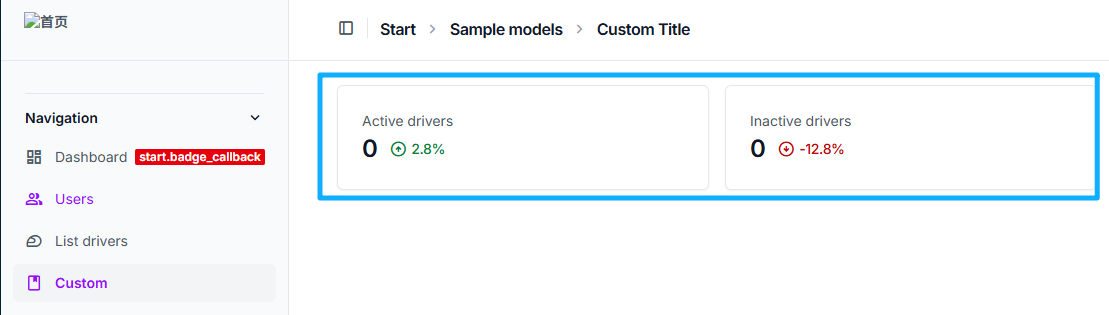
自定义组件步骤
- 注册组件 在
admin.py中注册组件。
python
from unfold.components import BaseComponent, register_component
from start.models import Driver, DriverStatus

@register_component
class DriverActiveComponent(BaseComponent):
    def get_context_data(self, **kwargs):
        context = super().get_context_data(**kwargs)

        context["children"] = render_to_string(
            # 组件模板路径
            "start/helpers/kpi_progress.html",
            # 组件context
            {
                "total": Driver.objects.filter(status=DriverStatus.ACTIVE).count(),
                "progress": "positive",
                "percentage": "2.8%",
            },
        )
return context- 组件模板 组件模板为django模板,用于渲染组件。在组件模板中可以使用组件context中的变量。
html
<!-- kpi_progress.html -->
{% load humanize %}

<div class="flex flex-row items-center gap-3">
    {{ total|intcomma }}
    <span class="flex flex-row gap-1 items-center font-normal text-sm tracking-tight {% if progress == "positive" %}text-green-700 dark:text-green-400{% elif progress == "negative" %}text-red-700 dark:text-red-400{% endif %}">
        {% if progress == "positive" %}
            <span class="material-symbols-outlined">arrow_circle_up</span>
        {% elif progress == "negative" %}
            <span class="material-symbols-outlined">arrow_circle_down</span>
        {% else %}
            <span class="material-symbols-outlined text-gray-500">remove_circle</span>
        {% endif %}
        <span class="font-medium">{{ percentage }}</span>
    </span>
</div>- 组件调用
- 直接调用。可以在网页模板中直接调用组件,放入block content中。
html
{% block content %}
<div class="grid gap-4 mb-4 md:grid-cols-2 lg:grid-cols-4 ">
    {% component "unfold/components/card.html" %}
        {% component "unfold/components/text.html" %}
            {% trans "Active drivers" %}
        {% endcomponent %}

        {% component "unfold/components/title.html" with component_class="DriverActiveComponent" %}{% endcomponent %}
    {% endcomponent %}

</div>
{% endblock %}- 间接调用。在
admin.py的ModelAdmin中通过list_before_template调用组件。
python
class DriverAdminMixin(ModelAdmin):
    # ……
list_before_template = "start/driver_list_before.html"driver_list_before.html为组件调用代码。
html
{% load unfold i18n %}

<div class="grid gap-4 mb-4 md:grid-cols-2 lg:grid-cols-4 ">
    {% component "unfold/components/card.html" %}
        {% component "unfold/components/text.html" %}
            {% trans "Active drivers" %}
        {% endcomponent %}

        {% component "unfold/components/title.html" with component_class="DriverActiveComponent" %}{% endcomponent %}
    {% endcomponent %}
 </div>