django-unfold-3: 调用组件
本文描述了如何在django unfold给原生组件提供数据,并在页面中调用。参照Django Unfold 组件,页面效果如下所示。
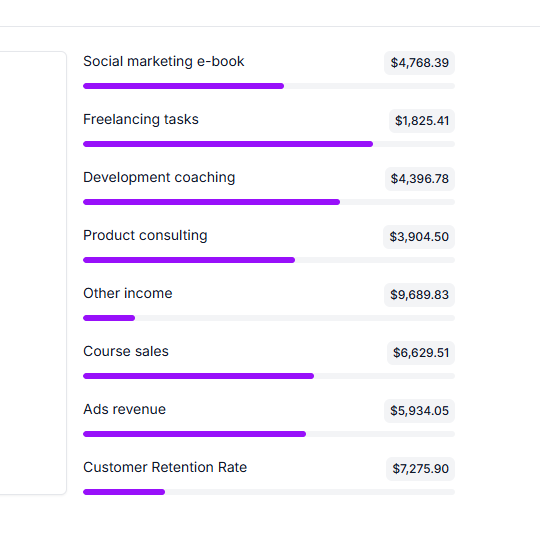
调用组件步骤
- 给组件提供数据
- 在自定义页面中提供数据 假定app名称为
start,在admin.py中,返回组件需要的上下文数据。
python
from unfold.views import UnfoldModelAdminViewMixin
from django.views.generic import TemplateView
import random
from start.models import SampleModel
from unfold.admin import ModelAdmin
from django.contrib.humanize.templatetags.humanize import intcomma

class CustomBasedView(UnfoldModelAdminViewMixin, TemplateView):
    title = "Custom Title"  # required: custom page header title
    permission_required = ()  # required: tuple of permissions

    # 调用组件的模板文件
    template_name = "start/custom_page.html"

    # 组件上下文数据
    def get_context_data(self, **kwargs):
        context = super().get_context_data(**kwargs)

        # Update context with progress bar data
        context.update(
            {
                "progress": [
                    {
                        "title": "Social marketing e-book",
                        "description": f"${intcomma(f'{random.uniform(1000, 9999):.02f}')}",
                        "value": random.randint(10, 90),
                    },
                    {
                        "title": "Freelancing tasks",
                        "description": f"${intcomma(f'{random.uniform(1000, 9999):.02f}')}",
                        "value": random.randint(10, 90),
                    },
                    {
                        "title": "Development coaching",
                        "description": f"${intcomma(f'{random.uniform(1000, 9999):.02f}')}",
                        "value": random.randint(10, 90),
                    },
                ]
            }
        )
        return context


@admin.register(SampleModel)
class CustomAdmin(ModelAdmin):

    def get_urls(self):
        # IMPORTANT: model_admin is required
        custom_view = self.admin_site.admin_view(
            CustomBasedView.as_view(model_admin=self)
        )

        return super().get_urls() + [
            path("custom_page", custom_view, name="custom_page"),
]- 在app.views中提供数据
python
from functools import lru_cache
from django.contrib.humanize.templatetags.humanize import intcomma
import random

def dashboard_callback(request, context):
    context.update(random_data())
    return context

@lru_cache
def random_data():
    return {
        "progress": [
            {
                "title": "Social marketing e-book",
                "description": f"${intcomma(f'{random.uniform(1000, 9999):.02f}')}",
                "value": random.randint(10, 90),
            },
            {
                "title": "Freelancing tasks",
                "description": f"${intcomma(f'{random.uniform(1000, 9999):.02f}')}",
                "value": random.randint(10, 90),
            },
            {
                "title": "Development coaching",
                "description": f"${intcomma(f'{random.uniform(1000, 9999):.02f}')}",
                "value": random.randint(10, 90),
            },
        ]
}- 在模板中调用组件
html
{% extends "admin/base.html" %}
{% load admin_urls i18n unfold %}

{% block content %}

    <div class="flex flex-col gap-5">
        {% for metric in progress %}
            {% component "unfold/components/progress.html" with title=metric.title description=metric.description value=metric.value %}{% endcomponent %}
        {% endfor %}
    </div>

{% endblock %}