django-unfold-3: Use Components
This article shows how to provide data to native components in Django Unfold and use them in pages. Follow Django Unfold Components, the page looks like this:
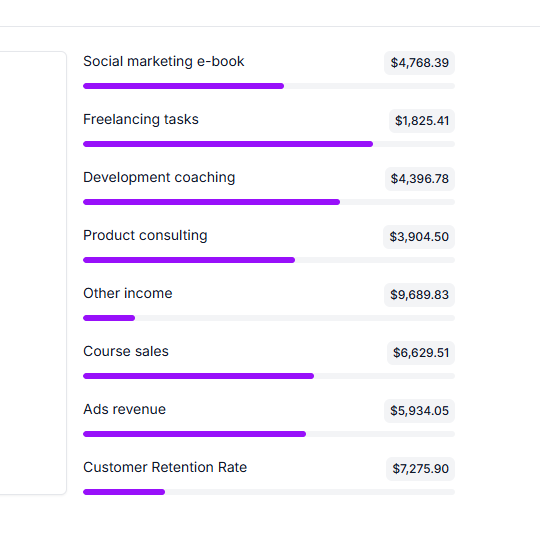
Use Component Steps
- Provide Data to Components
- Provide data in custom pages Assume the app name is
start. Inadmin.py, return the context data that components need.
python
from unfold.views import UnfoldModelAdminViewMixin
from django.views.generic import TemplateView
import random
from start.models import SampleModel
from unfold.admin import ModelAdmin
from django.contrib.humanize.templatetags.humanize import intcomma

class CustomBasedView(UnfoldModelAdminViewMixin, TemplateView):
    title = "Custom Title"  # required: custom page header title
    permission_required = ()  # required: tuple of permissions

    # template file that calls components
    template_name = "start/custom_page.html"

    # component context data
    def get_context_data(self, **kwargs):
        context = super().get_context_data(**kwargs)

        # Update context with progress bar data
        context.update(
            {
                "progress": [
                    {
                        "title": "Social marketing e-book",
                        "description": f"${intcomma(f'{random.uniform(1000, 9999):.02f}')}",
                        "value": random.randint(10, 90),
                    },
                    {
                        "title": "Freelancing tasks",
                        "description": f"${intcomma(f'{random.uniform(1000, 9999):.02f}')}",
                        "value": random.randint(10, 90),
                    },
                    {
                        "title": "Development coaching",
                        "description": f"${intcomma(f'{random.uniform(1000, 9999):.02f}')}",
                        "value": random.randint(10, 90),
                    },
                ]
            }
        )
        return context


@admin.register(SampleModel)
class CustomAdmin(ModelAdmin):

    def get_urls(self):
        # IMPORTANT: model_admin is required
        custom_view = self.admin_site.admin_view(
            CustomBasedView.as_view(model_admin=self)
        )

        return super().get_urls() + [
            path("custom_page", custom_view, name="custom_page"),
]- Provide data in app.views
python
from functools import lru_cache
from django.contrib.humanize.templatetags.humanize import intcomma
import random

def dashboard_callback(request, context):
    context.update(random_data())
    return context

@lru_cache
def random_data():
    return {
        "progress": [
            {
                "title": "Social marketing e-book",
                "description": f"${intcomma(f'{random.uniform(1000, 9999):.02f}')}",
                "value": random.randint(10, 90),
            },
            {
                "title": "Freelancing tasks",
                "description": f"${intcomma(f'{random.uniform(1000, 9999):.02f}')}",
                "value": random.randint(10, 90),
            },
            {
                "title": "Development coaching",
                "description": f"${intcomma(f'{random.uniform(1000, 9999):.02f}')}",
                "value": random.randint(10, 90),
            },
        ]
}- Use Components in Templates
html
{% extends "admin/base.html" %}
{% load admin_urls i18n unfold %}

{% block content %}

    <div class="flex flex-col gap-5">
        {% for metric in progress %}
            {% component "unfold/components/progress.html" with title=metric.title description=metric.description value=metric.value %}{% endcomponent %}
        {% endfor %}
    </div>

{% endblock %}