django-unfold-1: Custom Page
In django-unfold-0, we installed django-unfold. But its default page is the Django admin page. We can create a custom page and add it to the sidebar menu. Follow Django Unfold Custom Page, the page looks like this: 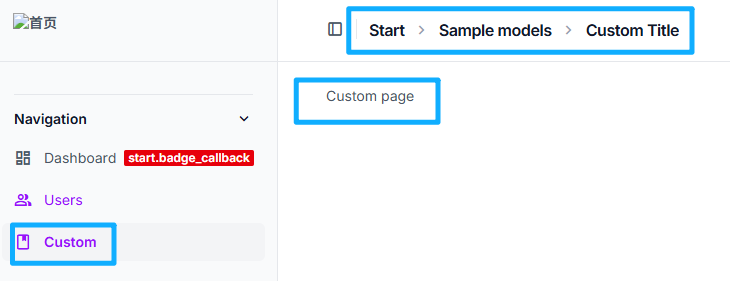
Custom Page Steps
- Custom pages need a model. First, create a model in the app's
models.py(assume the app is called start), then make migrations and migrate.
class SampleModel(models.Model):
    name = models.CharField(_("name"), max_length=255)
    description = models.TextField(_("description"), null=True, blank=True)

    class Meta:
        db_table = "sample_models"
        verbose_name = _("sample model")
        verbose_name_plural = _("sample models")

    def __str__(self):
return self.name- Register the model in
admin.pyFor django unfold, custom pages need to inherit UnfoldModelAdminViewMixin and TemplateView.
from start.models import SampleModel
from django.views.generic import TemplateView

from unfold.admin import ModelAdmin
from unfold.views import UnfoldModelAdminViewMixin

class CustomBasedView(UnfoldModelAdminViewMixin, TemplateView):
    title = "Custom Title"  # required: custom page header title
    permission_required = ()  # required: tuple of permissions
    template_name = "start/custom_page.html"


@admin.register(SampleModel)
class CustomAdmin(ModelAdmin):
    def get_urls(self):
        # IMPORTANT: model_admin is required
        custom_view = self.admin_site.admin_view(
            CustomBasedView.as_view(model_admin=self)
        )

        # url: /admin/start/sample_model/custom_page
        return super().get_urls() + [
            path("custom_page", custom_view, name="custom_page"),
]- Create templates/start directory under the start folder. Create
custom_page.htmlfile in this directory. The content is as follows.{% block content %}is the content display area.
html
{% extends "admin/base.html" %}

{% load admin_urls i18n unfold %}

{% block breadcrumbs %}{% if not is_popup %}
    <div class="px-4">
        <div class="container mb-6 mx-auto -my-3 lg:mb-12">
            <ul class="flex flex-wrap">
                {% url 'admin:index' as link %}
                {% trans 'Home' as name %}
                {% include 'unfold/helpers/breadcrumb_item.html' with link=link name=name %}

                {% url 'admin:SampleModel_changelist' as link %}
                {% trans 'Sample models' as name %}
                {% include 'unfold/helpers/breadcrumb_item.html' with link=link name=name %}

                {% trans 'Custom page' as name %}
                {% include 'unfold/helpers/breadcrumb_item.html' with name=name %}
            </ul>
        </div>
    </div>
{% endif %}{% endblock %}

{% block content %}
    {% trans "Custom page" %}
{% endblock %}- Add sidebar menu items in
settings.py's unfold configuration. Click to access the custom page. Note thatlink = reverse_lazy("admin:custom_page")in custom_page matches the name in step 2admin.py.return super().get_urls() + [ path("custom_page", custom_view, name="custom_page"), ]sidebar menu item configuration is as follows:
    "SIDEBAR": {
         "navigation": [
            {
                "title": _("Navigation"),
                "separator": True,  # Top border
                "collapsible": True,  # Collapsible group of links
                "items": [
                    {
                        "title": _("Custom"),
                        "icon": "book",
                        "link": reverse_lazy("admin:custom_page"),
                    },
                ],
            },
        ],
    },
🎉🎉🎉 Done!