django-unfold-2: Custom Components
Unfold has a full set of ready-made templates to speed up dashboard development. One of the best things about Unfold components is that they can be nested inside a single template file. This gives you almost endless layout options. Each component can access a children variable that holds the content from its parent component. Besides the children variable, components can also receive many variables from the parent template as component parameters. These parameters work the same way as Django templates, using the {% include with param1=value1 param2=value2 %} template tag syntax. This flexibility makes component structures both highly customizable and reusable, while keeping templates clean and organized.
This article shows how to create custom components in Django Unfold and use them in pages. Follow Django Unfold Components, the page looks like this:
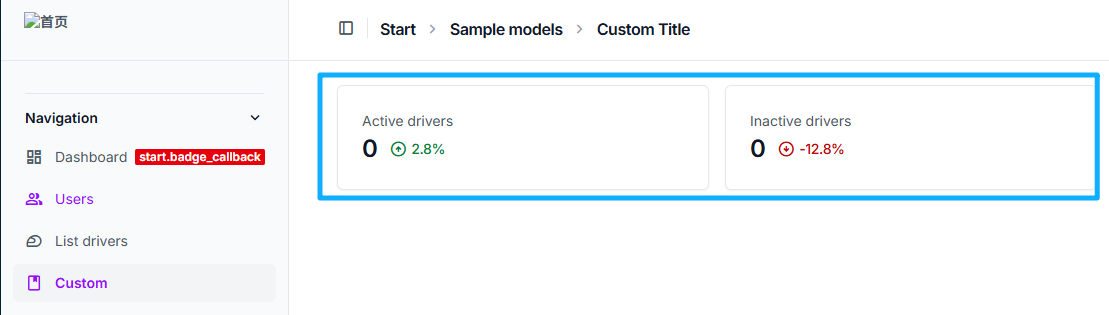
Custom Component Steps
- Register Component Register the component in
admin.py.
from unfold.components import BaseComponent, register_component
from start.models import Driver, DriverStatus

@register_component
class DriverActiveComponent(BaseComponent):
    def get_context_data(self, **kwargs):
        context = super().get_context_data(**kwargs)

        context["children"] = render_to_string(
            # component template path
            "start/helpers/kpi_progress.html",
            # component context
            {
                "total": Driver.objects.filter(status=DriverStatus.ACTIVE).count(),
                "progress": "positive",
                "percentage": "2.8%",
            },
        )
return context- Component Template The component template is a Django template used to render the component. You can use variables from the component context in the template.
<!-- kpi_progress.html -->
{% load humanize %}

<div class="flex flex-row items-center gap-3">
    {{ total|intcomma }}
    <span class="flex flex-row gap-1 items-center font-normal text-sm tracking-tight {% if progress == "positive" %}text-green-700 dark:text-green-400{% elif progress == "negative" %}text-red-700 dark:text-red-400{% endif %}">
        {% if progress == "positive" %}
            <span class="material-symbols-outlined">arrow_circle_up</span>
        {% elif progress == "negative" %}
            <span class="material-symbols-outlined">arrow_circle_down</span>
        {% else %}
            <span class="material-symbols-outlined text-gray-500">remove_circle</span>
        {% endif %}
        <span class="font-medium">{{ percentage }}</span>
    </span>
</div>- Component Usage
- Direct usage. You can use components directly in page templates, put them in block content.
{% block content %}
<div class="grid gap-4 mb-4 md:grid-cols-2 lg:grid-cols-4 ">
    {% component "unfold/components/card.html" %}
        {% component "unfold/components/text.html" %}
            {% trans "Active drivers" %}
        {% endcomponent %}

        {% component "unfold/components/title.html" with component_class="DriverActiveComponent" %}{% endcomponent %}
    {% endcomponent %}

</div>
{% endblock %}- Indirect usage. Use components through
list_before_templatein ModelAdmin inadmin.py.
class DriverAdminMixin(ModelAdmin):
    # ……
    list_before_template = "start/driver_list_before.html"
driver_list_before.html contains the component usage code.
{% load unfold i18n %}

<div class="grid gap-4 mb-4 md:grid-cols-2 lg:grid-cols-4 ">
    {% component "unfold/components/card.html" %}
        {% component "unfold/components/text.html" %}
            {% trans "Active drivers" %}
        {% endcomponent %}

        {% component "unfold/components/title.html" with component_class="DriverActiveComponent" %}{% endcomponent %}
    {% endcomponent %}
 </div>